

Aviation range / Aero Users
Aero Users
The people register of a flight school: who can fly today, on which aircraft, and what must be renewed this week. Licences, medical certificates, ratings, roles and pilot pages.
The plugin is built around aviation credentials. A credential is an object in its own right, with its aircraft, its reference, its examiner and its history of revalidations, because that is how a school keeps it and how an auditor reads it.
Available Free, no cap No external service English and French v4.4.0
No cap on people, no screen that switches off. The audit export and the pilot pages are in the version you install.
The plugin calls nothing to do its work. Files, dates and roles never leave your server.
Dedicated tables, no other plugin required. Aero Courses is not needed; when it is there, the two recognise each other.
What the plugin does
Keep the files
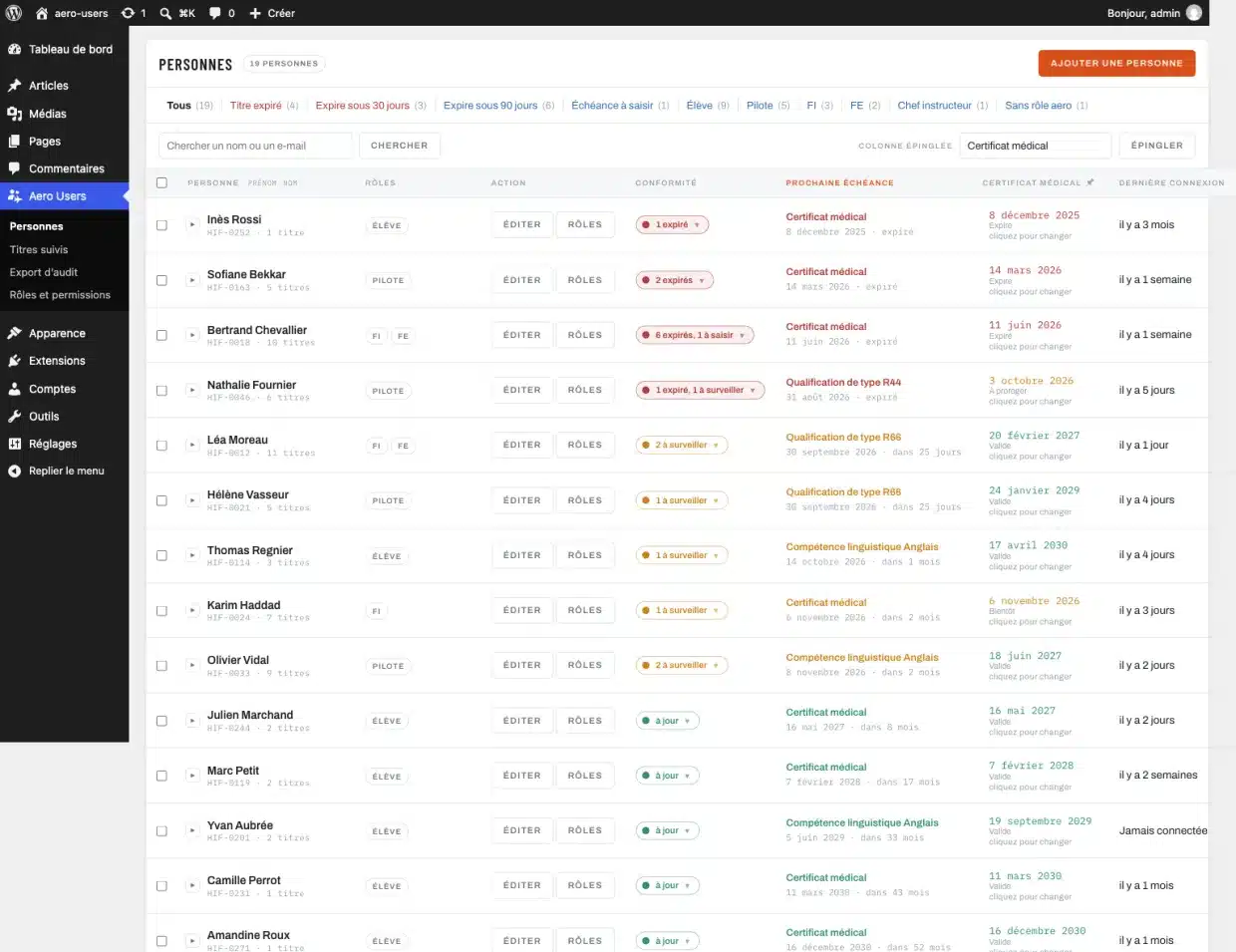
- A directory sorted by urgency
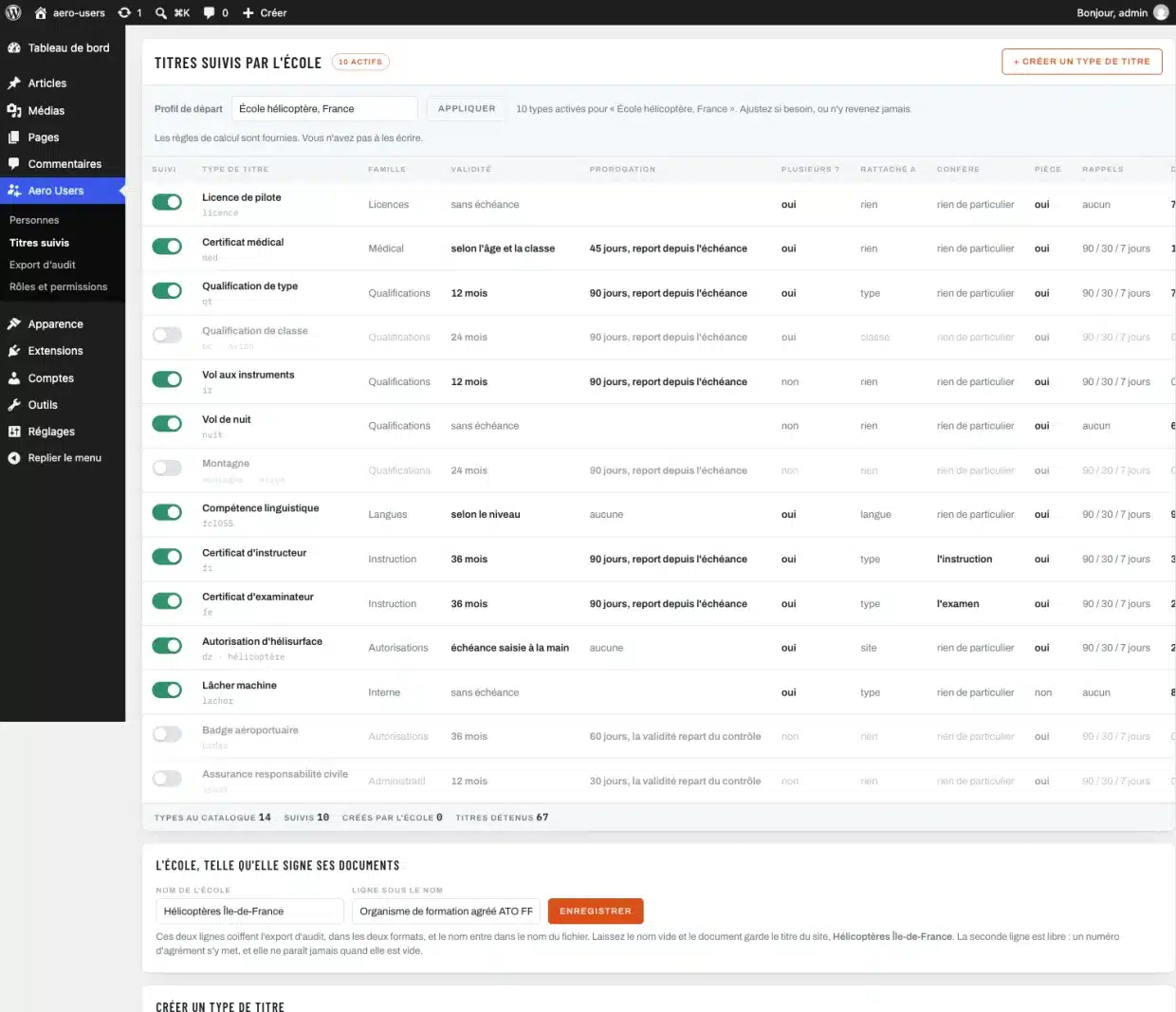
- Licences, medicals, type ratings, IR, night, FCL.055, FI, FE, helipad
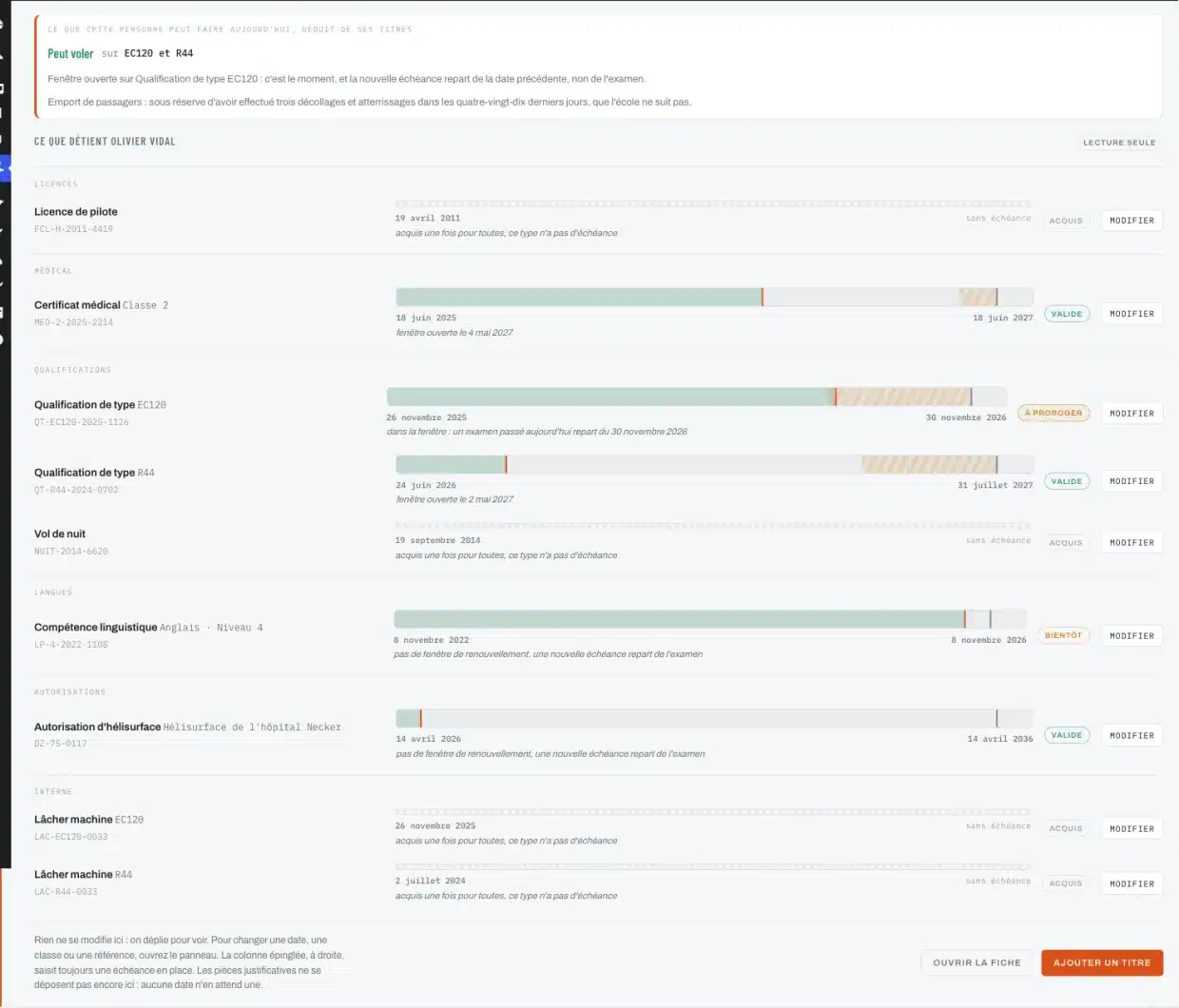
- Several aircraft ratings on the same person
- Credential types the school creates itself
- Roles that combine: student, pilot, instructor, examiner
Answer before the flight
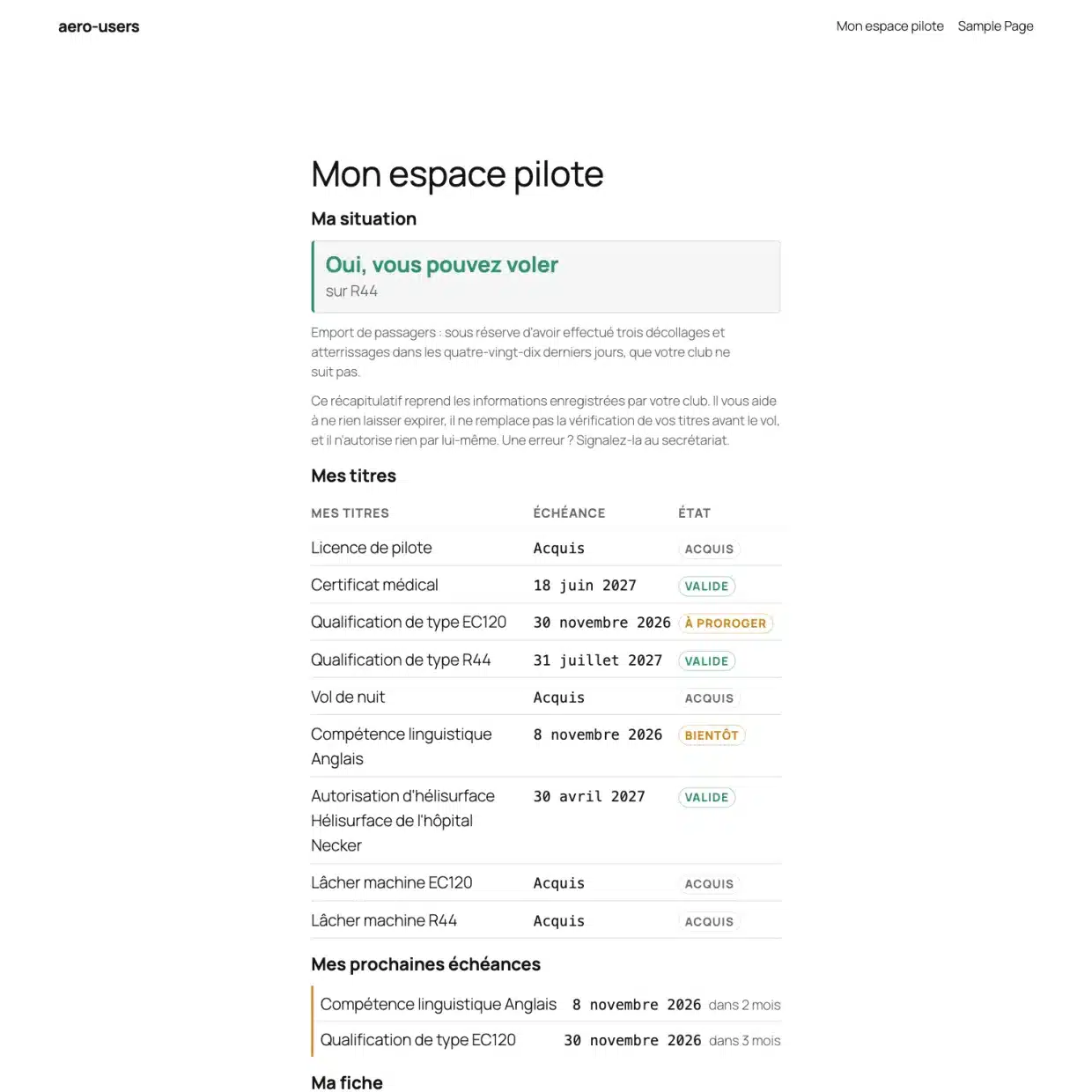
- “Can fly the EC120 and R44”, deduced from the credentials
- An expired medical suspends the privileges without making the rating expire
- Open revalidation windows flagged in time
- Five public blocks so the pilot can check for themselves
- Reminders at D-90, D-30, D-7 and D+1
Prove it at audit
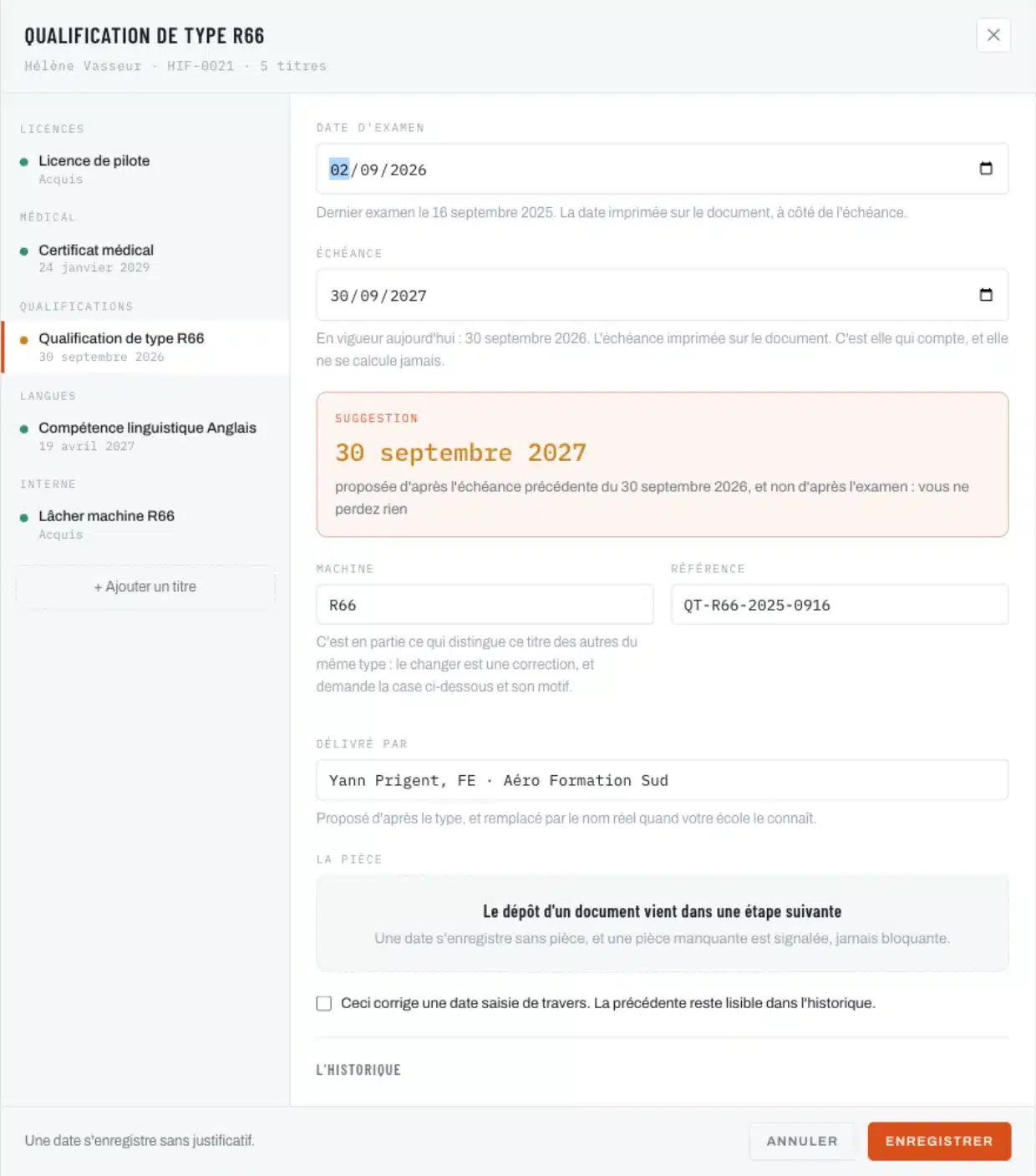
- A revalidation never overwrites the previous one
- Corrections stay readable, with their reason and their author
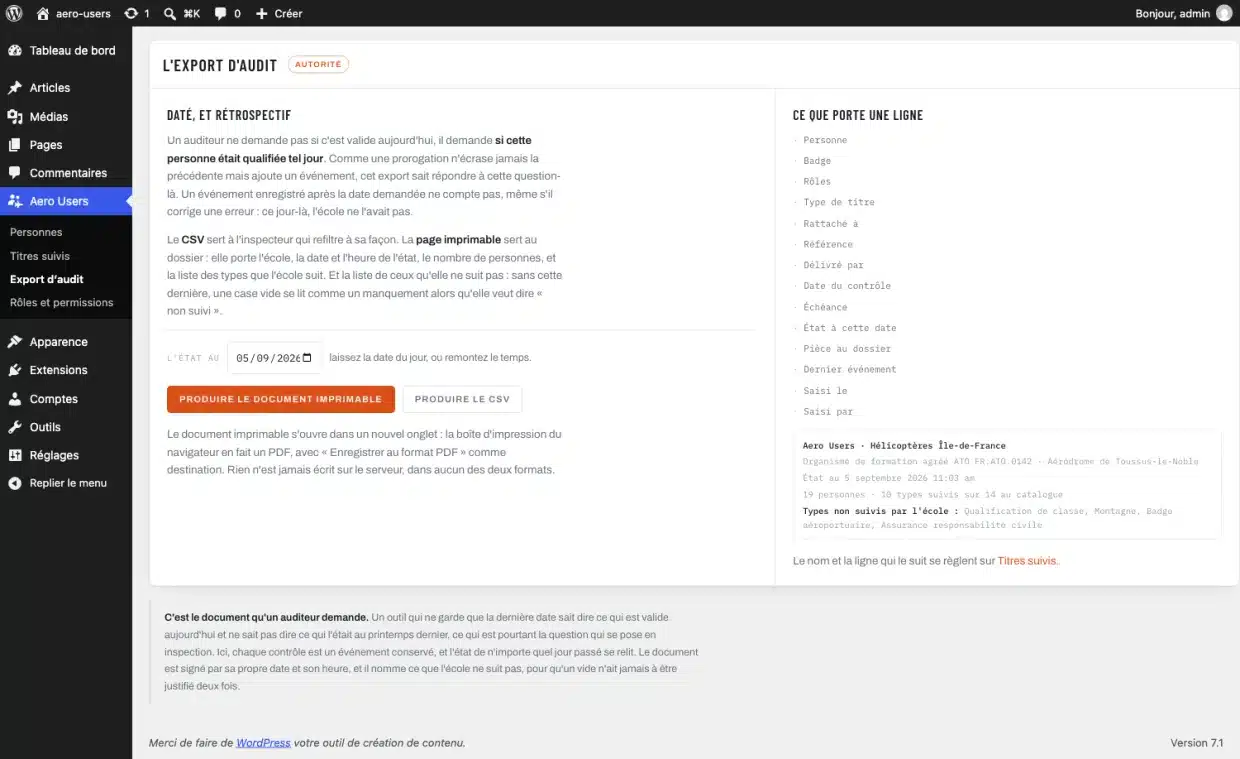
- The state of the club on any past date
- CSV export and printable document, both dated
- Untracked types named, so that a gap is not read as a shortcoming
The date is on the document, so we read it
A medical certificate carries two printed dates: the examination date and the expiry date. Many tools recompute the second from the first, the age and the class. At best this is redundant, and at worst contradictory: if the screen shows one date and the certificate another, it is the screen that is wrong in front of an inspector.
So Aero Users calculates no regulatory period. It suggests an expiry date, from the interval this person had last time, and anchors it on the old date when the examination falls within the window, so that you lose nothing. What you type always prevails.
What the plugin keeps
- The people
- A directory that shows at a glance who to call back today: the compliance of each file, the next expiry named, and a column of the school’s choosing.
- The credentials
- Licence, medical certificate, type ratings, instrument flying, language proficiency, instructor and examiner certificates, helipad authorisation. Fourteen types included, and the school creates as many as it wants.
- The dates
- The examination date and the expiry date, read from the document. The plugin suggests, the date read from the document prevails.
- The roles
- Student, pilot, instructor, examiner, chief instructor, and those the school adds. One person holds several, and the plugin never deletes a role it did not create.
- The pilot pages
- Five blocks to place on a page of the site: their standing, their credentials, their next expiry dates, their record, and the school overview for those entitled to it.
Installing it
The plugin is distributed through the WordPress.org directory. In your WordPress: Plugins, Add New Plugin, search for “Aero Users” and click Install Now. Updates then arrive on their own, as for any plugin from the directory. The plugin needs WordPress 6.3 and PHP 7.4 at least.
Frequently asked questions
Do I need Aero Courses to use it?
No. Aero Users stands on its own, and that is a principle: a school or a flying club can install it alone. When both are there, they recognise and complement each other.
Does it replace my spreadsheet?
That is the aim. The plugin knows four things a spreadsheet will never do: keep track of corrections, give the state of a file on a past date, suspend the privileges of an instructor whose medical lapses, and tell the pilot themselves where they stand.
What about my data?
It stays with you, in your WordPress. The plugin calls no external service, no data leaves your server, and there is nothing to set up with anyone.
Is the plugin limited?
No. No cap on people, no locked feature, no screen that switches off. The audit export and the pilot pages are in the version you install.
What about scanned certificates?
Document upload arrives in a coming version. The automatic analysis of an uploaded document, which reads the dates and fills in the fields on its own, will be the only paid feature, per document and with no subscription.
Changelog
- 4.4.0
- On the roles screen, the permissions of a role are ticked in one go and saved with one button; the page returns to the role being edited. The shared core of the range moves to 1.5.1.
See the 9 earlier versions
- 4.3.1
- The shared core of the range moves to 1.5.0 and knows where Aero Fleet sits in the menu.
- 4.3.0
- A Dashboard: the school today in four figures, the next expiry dates, what has happened, the reminders and the tracked credentials at a glance. Each screen carries the banner and the tabs of the Aero range.
- 4.2.0
- The directory shows the Aero range: the plugins of the range, one line each, those that are installed, read from wptechnology.com at most once a day.
- 4.1.2
- Distributed through the WordPress.org directory. Changing the email address or the name of an account from a record also requires the WordPress permission to edit that account; the school’s fields are saved without it. Translations arrive through translate.wordpress.org.
- 4.1.1
- Settings and displays reviewed and corrected: each value entered is checked at the moment the plugin reads it.
- 4.1.0
- The two sentences added under what a pilot reads belong to the school: it keeps them, removes them or rewrites them. The record of a person returns to the order of the approved mock-up, badge number third, email fourth.
- 4.0.0
- The school decides what a record contains: its own fields, nine types, a visibility setting per field, and a field that is disabled before it is deleted. The eight included fields can be renamed and moved like the others.
- 3.3.0
- The log can be read on screen: refused documents, messages the mail server rejected, purges. Nothing is erased from it.
- 3.2.0
- The retention period of documents can be set. Once the period has passed, the document is flagged and stays readable; purging is a manual action that names what it removes.
Need one more feature?
A field specific to your school, a particular export, a rule your authority imposes on you: we add features to the plugin or write a dedicated module.