

Aviation range / Aerodrome Metar Taf
Aerodrome Metar Taf
The weather at your aerodrome on the club’s site, readable without knowing the code: the METAR and the TAF decoded in plain language, the flight category first, and the raw message one click away for the pilots who read it.
A student pilot opens the club’s site on Saturday morning to find out whether the lesson is on. The instructor opens the same page to see what the TAF says for the afternoon slot. The webmaster who built that page has never read a METAR in their life, and does not have to. Aerodrome Metar Taf is written for all three: a flying club or a flight school.
Available Free, no API key NOAA data English and French v3.0.0
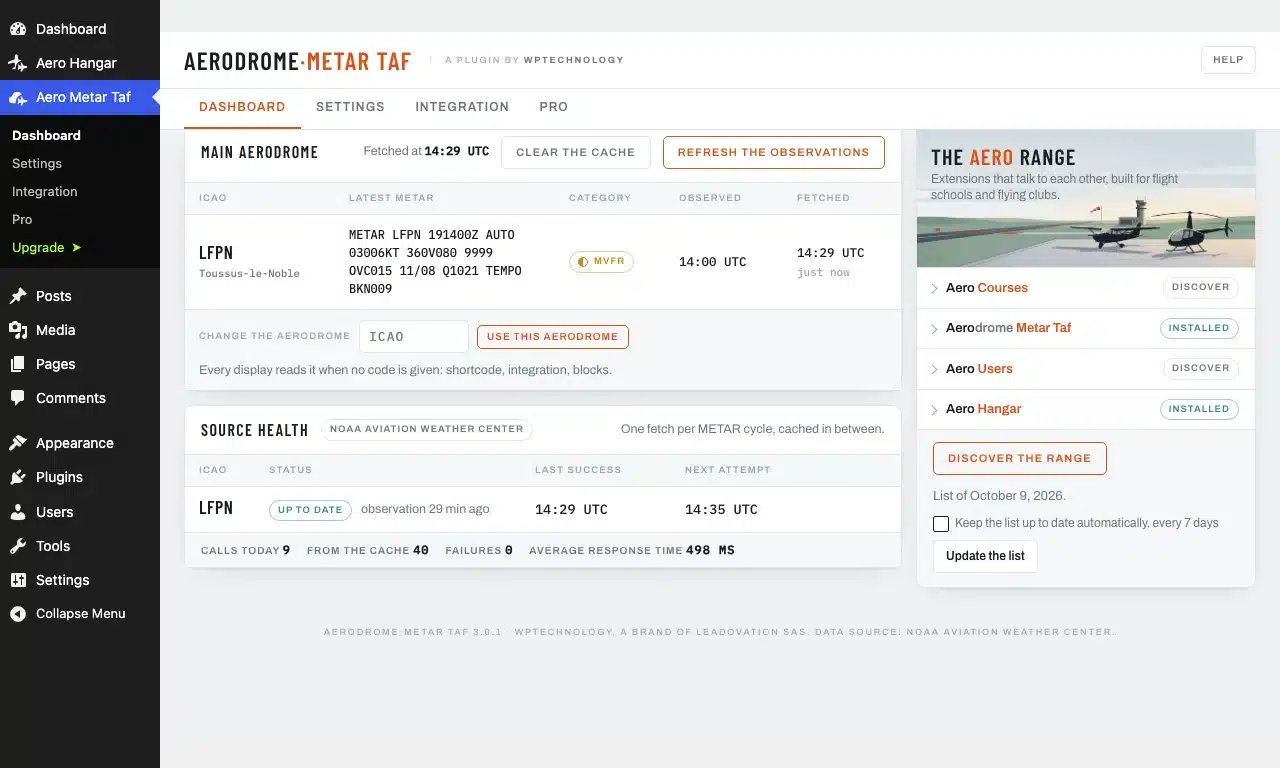
The dashboard follows the club’s aerodrome, and every display reads it by default. Another ICAO code goes in the shortcode or the block, for any display.
The reports come from the public API of the NOAA Aviation Weather Center. Nothing to create, nothing to renew.
Two times on every card: the time of the observation and the time it was fetched. A message more than two hours old is greyed out and says so, and the source itself announces when it stops answering.
What the visitor sees
- The category first
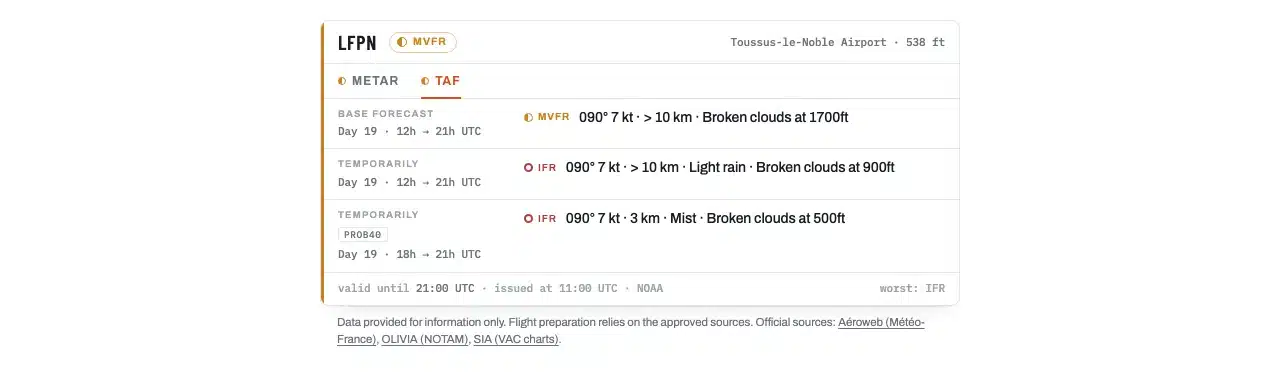
- VFR, MVFR, IFR or LIFR, each with its colour and its dot shape, and the text always beside it: colour alone never carries the information.
- The report in plain language
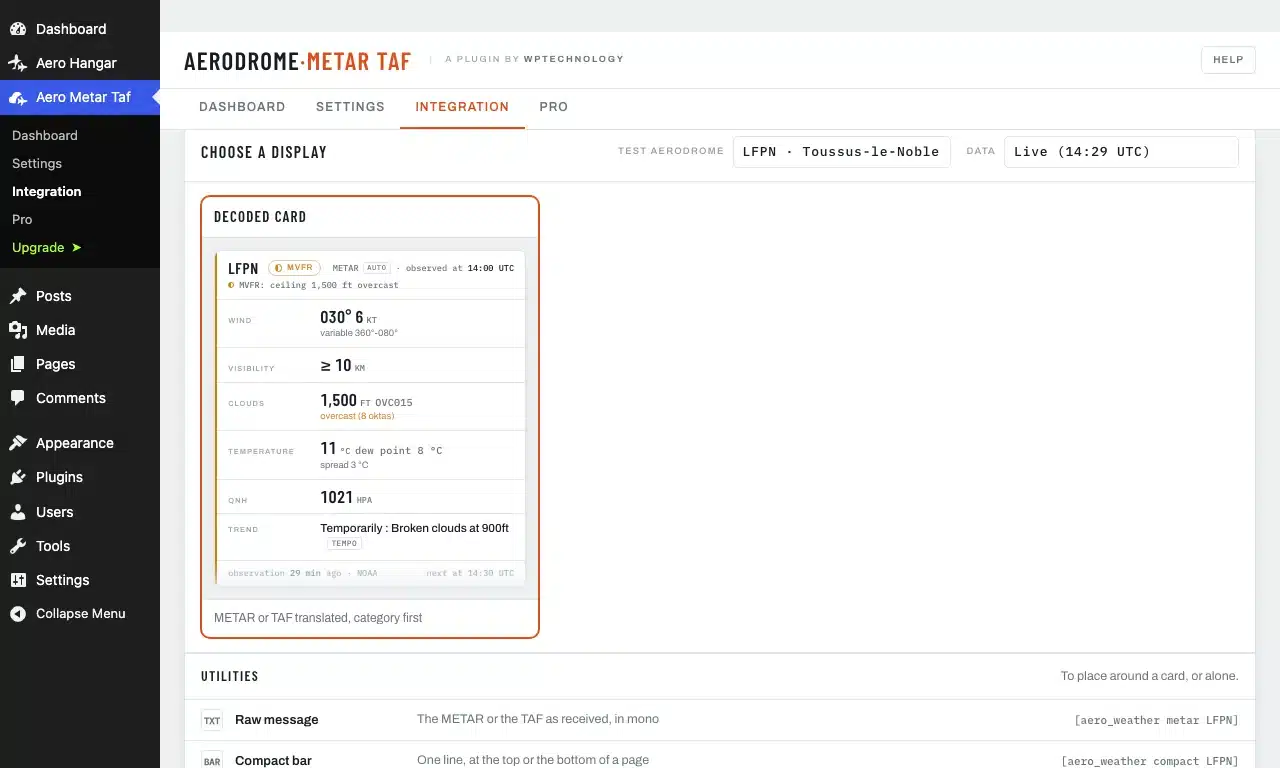
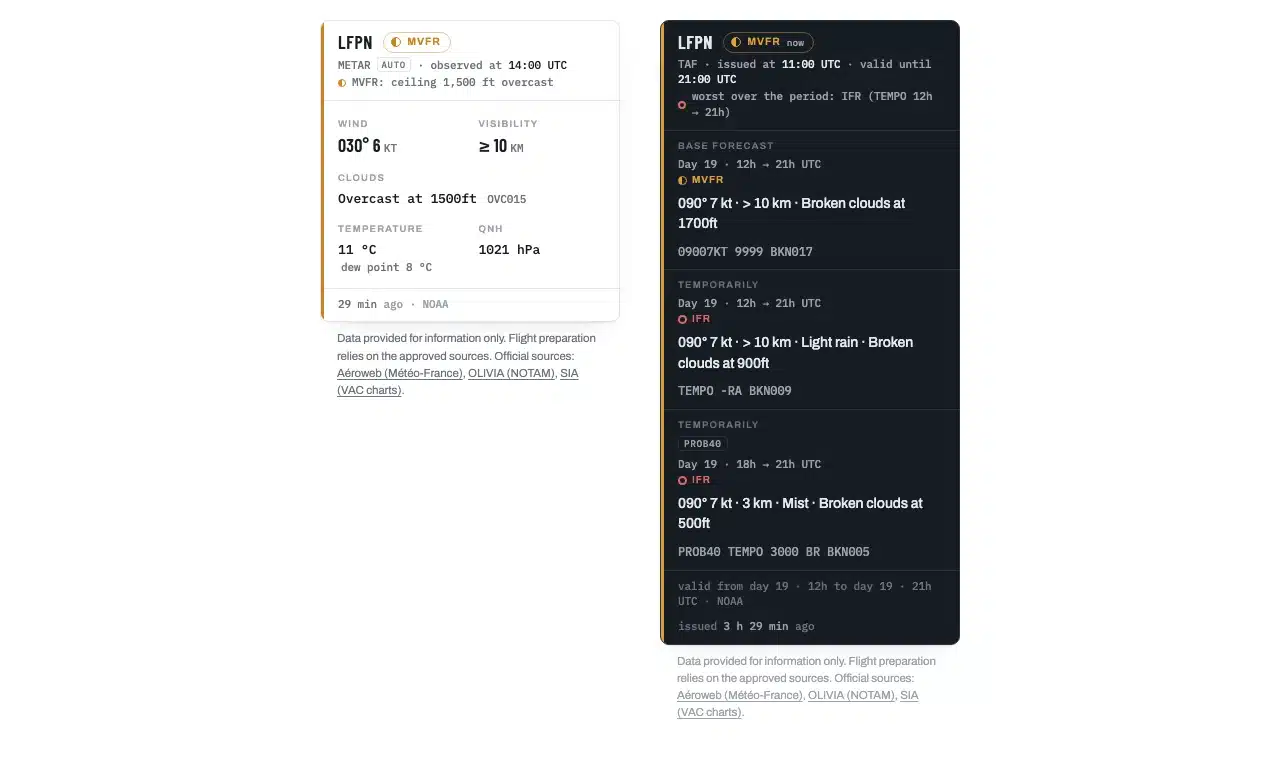
- Wind, visibility, cloud, temperature, dew point, QNH, in words. The TAF reads like a TAF: the base forecast with its validity, then one line per change period.
- The raw message
- The METAR or the TAF as received, in a fixed-width block, for the pilots who read the code.
- The disclaimer
- The data is provided for information only, and the text points to the official sources: Aéroweb, OLIVIA and the SIA. Under every card, once per page, or never, as the club chooses.
What the plugin does, for free
Show the report
- The raw message. The METAR or the TAF exactly as received, for whoever reads the code.
- The decoded card, METAR and TAF. Wind, visibility, cloud, temperature, QNH in words; the TAF as base forecast then periods, the worst case written underneath.
- The compact card. The same card, dense, for a column or a footer; the “flat” skin blends it into the theme.
- The bar and the badge. One line at the top of the page, or the category alone in a heading, a menu, a column.
Serve the club’s aerodrome
- The club’s aerodrome. Chosen once, read by every display and every new block.
- Another aerodrome when needed. The ICAO code written in a shortcode or a block, for any display.
- A widget. The bar, the raw message, the badge or the decoded card in a sidebar.
- The disclaimer. The legal text with the official links, in the club’s own words.
Place it without writing a line
- A Gutenberg block. The “Aerodrome METAR TAF” block, in the Aero category, carries every display of the plugin and every option.
- The Integration tab. Choose, set, look at the live preview, copy the shortcode or the block.
- One shortcode, one grammar. A view, an ICAO code, then the options that differ from the default value.
- Settings on one screen. Main aerodrome, wind unit, category profile explained in plain language, UTC and local time, text and position of the disclaimer.
- Two template functions. For the theme developer, with the same views.
- A dashboard. The club’s aerodrome, its latest METAR, the age of the data, the health of the source.
The pilot in command decides
The data displayed is provided for information only. Flight preparation relies on the approved sources: the pilot goes to the national meteorological service and to the aeronautical information service, in France Aéroweb, OLIVIA and the SIA, and the plugin’s disclaimer says so, with the links. The VFR, MVFR, IFR and LIFR categories are a display convention, the NOAA one or its indicative metric adaptation, and have no regulatory value: they are in no way EASA or SERA minima.
The plugin shows the conditions. It never tells anyone whether the day is good for flying: the Club thresholds of the Pro version are the club’s figures, entered by the club, and the plugin only compares a forecast with those figures. The decision to fly, and how, remains with the pilot in command.
The Pro version
Aerodrome Metar Taf Pro is a second plugin, installed on top of this one, for the club that follows several aerodromes or wants its own rules on the page. Nothing that follows is present in the free package, which runs without a licence. Pro adds.
Several aerodromes and the club’s runway
- Favourite aerodromes. The dashboard follows every aerodrome of the club, its latest METAR and the health of the source.
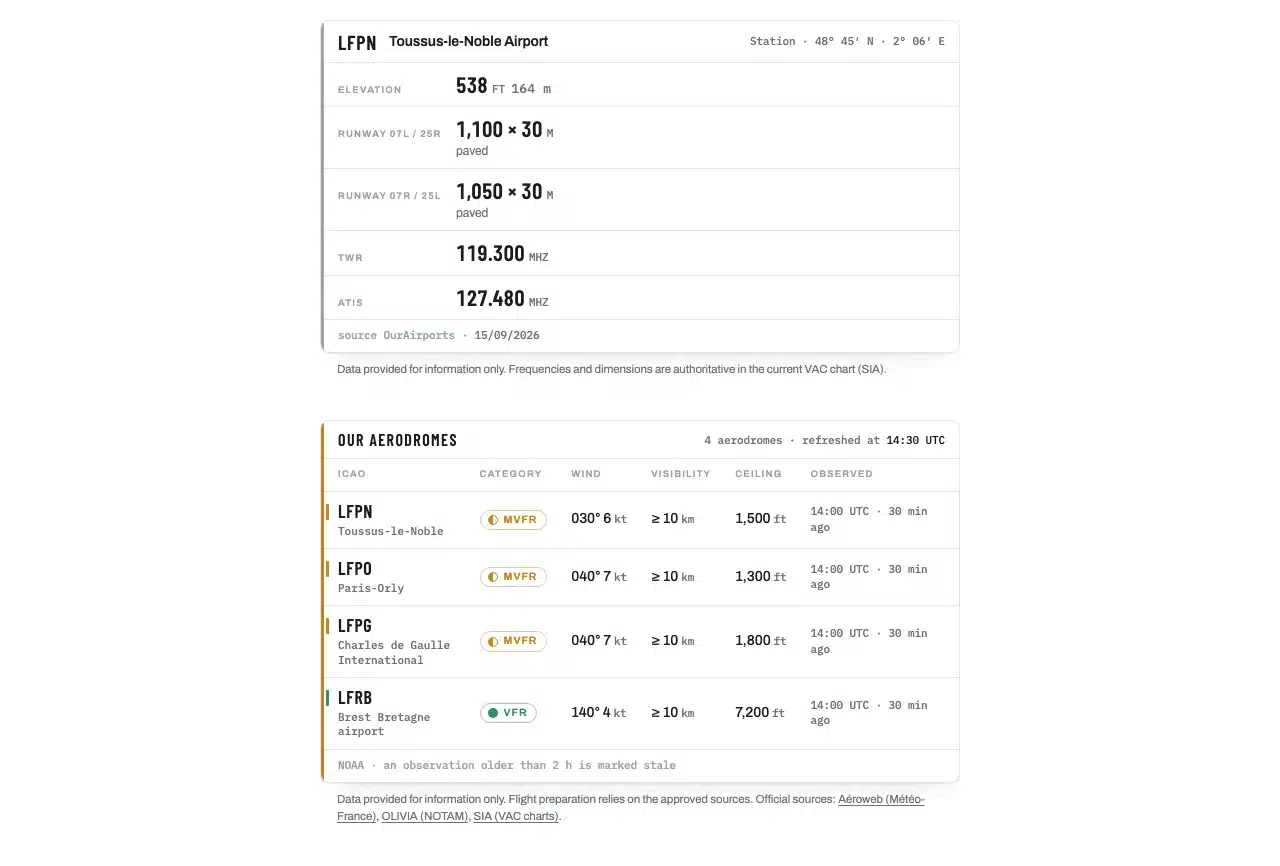
- The multi-aerodrome table. One line per aerodrome, category, wind, visibility, ceiling, observation time.
- The visitor selector. An ICAO field, a button, the result underneath: the visitor chooses the aerodrome.
- The wind on the runway. Total, gust and crosswind on the club’s runway, on every card that shows the wind.
- The aerodrome details. Elevation, runways, frequencies, from OurAirports and dated; every field checked by the club against the VAC chart.
- More displays. The tabbed METAR and TAF panel, a single field (“QNH 1016 hPa” in a sentence), and the aerodrome’s webcam.
Conditions of the day against the Club thresholds
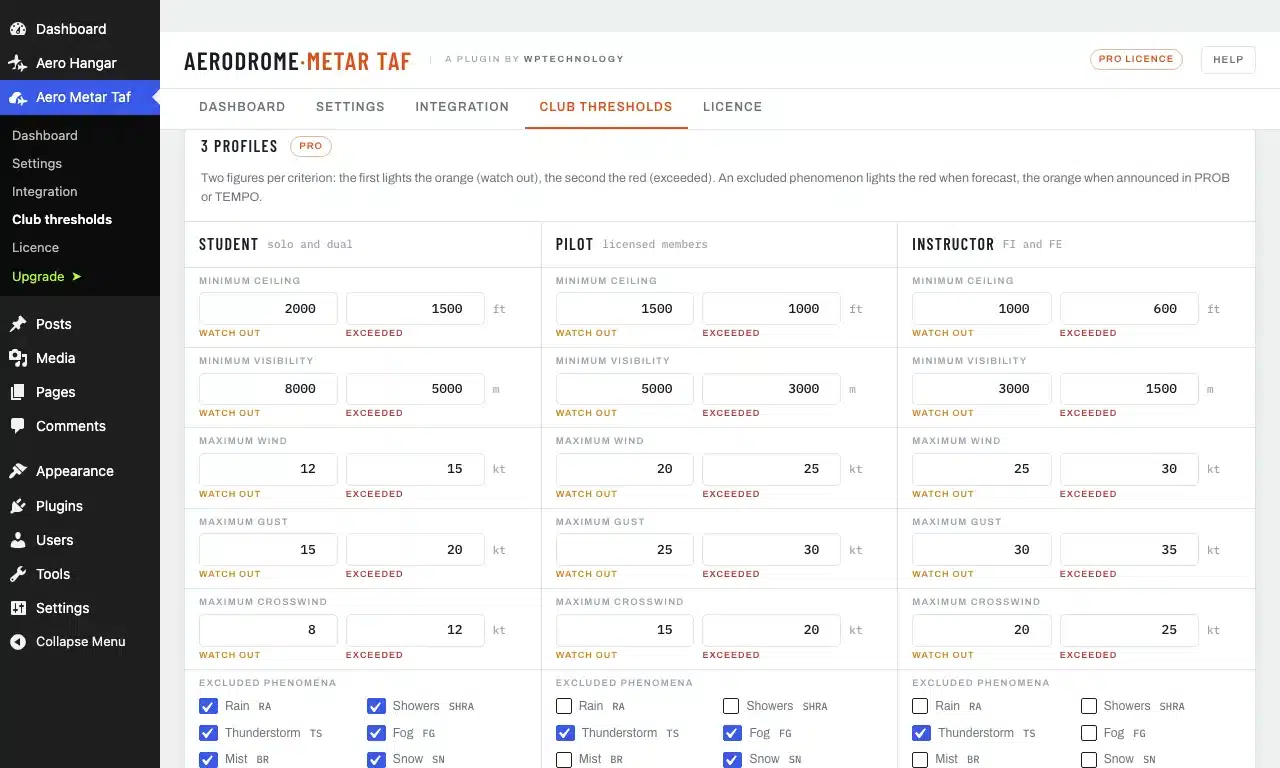
- Three profiles. Student pilot, pilot, instructor, each with its own figures.
- Two thresholds per criterion. A caution figure, then an exceedance figure, for the wind, the gust, the crosswind, the ceiling and the visibility, and the phenomena each profile excludes: fog, thunderstorm, freezing.
- One light per profile, period by period. Green, amber or red on the TAF of the day. The club writes what it allows; the pilot decides.
- A compact light. For a single profile, in a sidebar.
Read the day
- The TAF timeline. The forecast hour by hour, to choose the slot on the page.
- The wind rose on the runways. The wind drawn against the runway headings, the runway in use at a glance.
- Student mode. Every group of the METAR and the TAF explained, to learn to read the weather during training.
- Coming soon. An alert to the instructors when the day crosses a threshold, the history of conditions at the aerodrome, and a printable briefing on one A4 page.
The club-house and the page builders
- The club-house screen. Full screen, it rotates on its own, for the television next to the coffee machine.
- The scrolling banner. The conditions scroll like a news ticker and take up no height.
- The Avada elements. The displays as native Fusion Builder elements, under “WPTechnology”, with the same options as the shortcodes. Elementor widgets are on the way.
- Updates and support. Included in the licence.
In the club’s colours
- The club’s colour and logo. An accent colour, six shades or a hex code, and the logo in the header of the panel, the decoded card and the club-house screen.
- Two category palettes. The Aero range one, or the NWS code of American charts and of Windy: blue for MVFR, magenta for LIFR. The badge shapes never change.
- Typography, corners, shadow. The range fonts or those of the site’s theme; square corners, 9 px or rounded; with or without shadow. The 3 px edge stays: it is the signature.
- The default theme. Light, dark, or the visitor’s setting, without writing it in every shortcode.
- Additional CSS. For the webmaster, applied to the displays only, with a live preview that changes while you adjust.

The Aero range
Plugins that talk to each other
Aerodrome Metar Taf is one of the WPTechnology plugins written for flight schools and flying clubs. They share the same design and the same idea: one job each, done properly, and they recognise each other when they are installed side by side.
- Aero Courses: the ground school timetable and the bookings, the semester built once and published on the school’s site.
- Aero Users: the directory of the people of the school, student pilots, pilots, instructors, examiners, shared by the whole range.
- Aero Weight & Balance: the weight and balance of the club’s aircraft, with the envelope drawn. Coming soon.
Installing it
Download the archive, then in your WordPress: Plugins, Add New Plugin, Upload Plugin, choose the file and activate. Open the Aero Metar Taf menu and give your main aerodrome by its ICAO code: every display offered and every new block starts from it. Then place the “Aerodrome METAR TAF” block on a page, or the shortcode the Integration tab writes for you, for example [aero_weather decoded LFPN type="taf"]. The plugin needs WordPress 6.0 and PHP 8.0 at least.
Requirements
- Version
- 3.0.0
- WordPress
- 6.0 or later, tested up to 7.1
- PHP
- 8.0 or later
- Licence
- GPLv2 or later
- Integration
- Gutenberg block, shortcodes, template functions; Avada with the Pro version
- Data
- NOAA Aviation Weather Center live
The steps
- 1 Upload the archive and activate the plugin.
- 2 Open the Aero Metar Taf menu and give the main aerodrome by its ICAO code.
- 3 In the Integration tab, choose a display, set its options, copy the block or the shortcode.
- 4 Place it on a page: the weather shows, the disclaimer underneath.
Links and sources
- Languages. The plugin ships in English and in French.
- The reports. METAR and TAF from the public API of the NOAA Aviation Weather Center, with no key; only the requested ICAO code is sent.
Frequently asked questions
Is the data official?
No. It is provided for information only. To prepare a flight, always refer to the approved sources: the national meteorological service, the AIS and the NOTAMs. The plugin’s disclaimer carries the links to Aéroweb, OLIVIA and the SIA.
Do I need an API key?
No. The reports come from the free public API of the NOAA. There is no account to create, no quota to watch and nothing to renew.
Why does the TAF card show a different category from the METAR card?
Because they answer two questions. The METAR card shows the category of the latest observation. The TAF card shows the one for the forecast period in progress, and says which; the worst case over the whole validity, TEMPO and PROB included, is written underneath in small print. A CAVOK afternoon with a PROB30 of fog at night reads VFR now, worst case LIFR, and never IFR in red at the top.
Can the visitor choose the aerodrome?
With the Pro version, yes. The selector is an ICAO field and a button, and the result shows underneath. Any aerodrome known to the NOAA source can be requested, and there is no list to maintain.
Where do the runways and the elevation of the Pro version come from?
From OurAirports, a public domain database whose extract is shipped with the Pro version, with its date shown on the card. When an aerodrome is missing from it, the NOAA aerodrome data takes over. Either way the club has the last word: every field can be corrected from the admin, and a corrected field reads “verified against the VAC chart”.
Gutenberg, Avada, Elementor?
Gutenberg, yes, in full and for free: the “Aerodrome METAR TAF” block carries every display of the plugin and every option. Avada, with the Pro version: the displays are Fusion Builder elements under “WPTechnology”. Elementor widgets are on the way. On any page builder, the shortcode works today.
Is anything locked behind a licence?
No. Nothing here is closed, counted or timed: the plugin is built for the club’s aerodrome, and every display it carries can also be placed for another aerodrome, by its ICAO code. The Pro version is a second plugin that brings its own displays; this package does not contain them, and nothing in it refuses anything.
How many calls to the service?
One per aerodrome, when the data you have has stopped being current. The cache follows the aerodrome’s issuing rhythm: a thousand visitors on the same page do not trigger a thousand calls.
Changelog
- 3.0.0
- The plugin follows the club’s aerodrome: the dashboard shows it with a field to change it, and every display can still read another ICAO code. The free plugin keeps the raw message, the bar, the badge, the decoded card and the disclaimer; the multi-aerodrome table, the selector, the aerodrome details, the panel, the single field, the webcam and the wind on the runway move to the Pro version. The plugin’s screens say in one sentence what Pro adds, and the sentence closes with one click.
See the 9 earlier versions
- 2.2.6
- The Freemius SDK moves to its latest version. Uninstalling also erases the aerodrome records received from the weather service. The other plugins of the range read the aerodrome weather through a stable interface.
- 2.2.5
- In the range card of the dashboard, every plugin name is written the same way: Aero in black, drome in grey, Metar Taf in colour.
- 2.2.4
- The admin menu is called Aero Metar Taf, which fits on one line of the sidebar; the screen keeps its full name.
- 2.2.3
- Every value placed in a display (wind, temperature, labels) is protected at the very place where it is written.
- 2.2.2
- A card shown in a block, a widget, the visitor selector or a preview goes through the same tag filter as the other displays.
- 2.2.1
- What a filter returns in a card is escaped like the rest; the cache lock is taken in a single operation.
- 2.2.0
- The plugin is now called Aerodrome METAR TAF, and Leadovation Aerodrome METAR and TAF in the WordPress.org directory: “Aero Weather” was the name of an existing product. Every setting is sanitised field by field.
- 2.1.2
- The range card of the dashboard reads the list from wptechnology.com once a day at most: a plugin published later appears without an update. The directory package no longer carries translation files.
- 2.1.0
- Pro version: the Appearance card puts the displays in the club’s colours, accent colour, logo, Aero or NWS palette, theme fonts, corners and shadow, default theme, additional CSS, with a live preview. For everyone: the theme=auto option follows the visitor’s light or dark setting.
Need one more feature?
A data source specific to your country, a threshold your operation requires, a display for your club-house screen: we add features to the plugin or develop a dedicated module.